

Google Flights Hacks That Actually Get You Cheaper Airfare

There was a stretch of my life when I had eleven browser tabs open at once, all of them flight searches, none of them getting cheaper. I was still working my old office job in New York at the time, rationing vacation days like they were currency, convinced that if I refreshed enough times the internet would eventually reward me. It didn’t. What finally changed things was not a secret trick. It was learning to search in a completely different order, and learning which “hacks” are real and which are just internet folklore that has outlived its usefulness.
So let’s do this properly. I’ll show you how I set up a search, what the tools actually do, when to click buy, and where the traps are hiding. Not magic. Just a system you can run in twenty minutes and then walk away from.
Start by throwing out the myths that cost you money
Before the useful stuff, we need to clear the junk out of the way, because most people arrive at Google Flights already carrying bad advice.
Incognito mode does not lower fares. This one refuses to die. The idea is that airlines watch your cookies and punish you for looking twice. In practice, Google Flights shows fares pulled from more than 300 airline and booking partners, and those feeds refresh roughly once every twenty-four hours for everyone. If you see a price change between searches, you are almost always seeing the fare bucket sell out, not a personalized penalty. Search in incognito if it makes you feel better. It costs nothing. Just don’t build a strategy on it.
Booking on a Tuesday is basically a rounding error. Google’s own analysis of four years of flight data found that Tuesday is indeed the cheapest day to purchase, by all of 1.3% compared with Sunday, the most expensive day. That is a few dollars on a typical fare. Meanwhile, the same Google Flights booking research found that flying Monday through Wednesday runs about 13% cheaper than weekend departures, and accepting a layover instead of insisting on nonstop saves around 22% on average. Which day you shop is noise. Which day you fly is signal.
There is no perfect moment to press buy. I say a version of this constantly on this blog because it applies to more than airfare. Waiting for perfect is how three years go by without a trip. The goal is not the theoretical lowest price in the universe. The goal is a price you can look at without wincing, booked early enough that you can start actually planning.

Set your search up so it can find deals in the first place
Most people hand Google Flights a locked box and then complain it found nothing. You type one origin, one destination, two fixed dates, hit search, and accept whatever appears. That search has no room to breathe.
Here is the reorder I use. Open Google Flights and, before you touch the calendar, set the passenger count, cabin class, and stops. Then leave the dates loose. Google’s help documentation is worth reading once because it explains something people miss: the results page carries an insights strip with Dates, Price graph, and Airports panels, and those panels are where the savings live, not in the flight list itself.
Use the date grid before you commit to dates
Click the date field, then choose Date grid. You get a matrix of departure dates against return dates, with the cheapest combinations highlighted. This is the single fastest way to see that leaving one day earlier saves you $180, which is roughly a week of street food in Chiang Mai, where I taught English and ate better on a few dollars a day than I sometimes do in Manhattan.
Then click Price graph for the same route. The grid answers “which days,” the graph answers “which weeks or months.” If you have any flexibility at all, the graph will usually show you a shoulder season trough you didn’t know existed.
Search multiple airports at once
In the origin field, type your home airport, then keep typing others. Google lets you stack several airports into one search. From New York I always run JFK, LGA, and EWR together, and I add PHL when I’m feeling adventurous about a cheap bus ride. Do the same on the destination side. Flying into a secondary airport an hour from the city center is a completely reasonable trade when it saves you a hundred dollars and the train is easy.
You can also mix and match returns. Google will happily route you out of one airport and back into another in the same metro area, which is a small thing that quietly shaves fares.
Filter for what you actually need, not what sounds nice
Under More filters, you can cap layover duration, exclude specific airlines, set a maximum price, and screen out basic economy on US and Canada trips. There is also a bags filter that recalculates displayed prices to include carry-on or checked bag fees, and it occasionally reveals that checking a bag is cheaper than bringing one aboard, which still feels absurd every time I see it. Turn that filter on before you compare anything, because a $39 fare with a $65 bag fee is not a $39 fare.
The Explore map is the tool that changes how you travel
If I could only keep one feature, this is it. Explore flips the whole exercise around. Instead of “how much to get to this place,” it asks “where can I go for this money.”
Put your home airport in, set the destination field to Anywhere, and then, crucially, open the calendar and switch to flexible dates. Choose a trip length such as one week or two weeks, and a window such as the next six months. The map fills with prices.
This is how flexible travelers actually find bargains, and it is closer to how I think about travel anyway. When I backpacked solo across Europe, half my route was decided by whatever transport was cheapest that week, and those unplanned detours became the parts I still tell people about. The map rewards the same mindset.
Two things make Explore far more powerful:
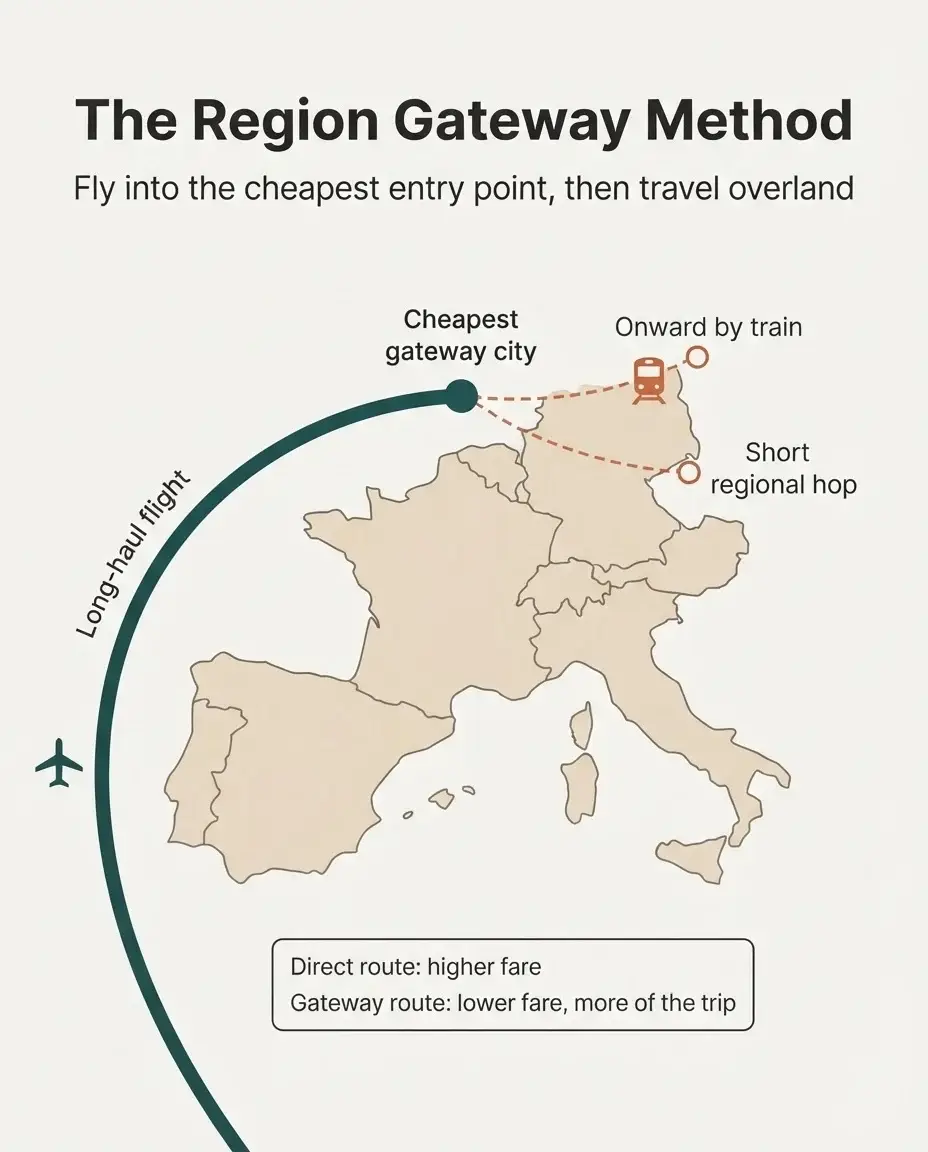
Zoom into a region, not a country. Instead of searching “Italy,” zoom the map to Southern Europe and look at the whole cluster. You will often find that flying into a neighboring country and taking a train costs less than flying direct, and the overland leg becomes part of the trip rather than a chore.
Use the region gateway approach. Find the cheapest entry point into a continent, book that, then price the short hop separately. Long-haul pricing is not linear, and one gateway city can be hundreds cheaper than another a short flight away.
There is also an AI-powered Flight Deals tool inside Google Flights where you describe a trip in plain language, something like “ten days somewhere warm with great food, nonstop only,” and it hunts for fares priced at least 20% below the typical price for that route over the past year. It launched in beta in 2025 and has since expanded to most of the world. It is genuinely fun to play with, though it does not handle multi-city trips or groups larger than four yet.
Know what a good price actually looks like
You cannot recognize a deal without a baseline, and this is where most guides leave you hanging.
Two reference points help. First, Google’s own price insights, which appear above your results as plain-language notes: “prices are less than usual,” “prices are likely to increase,” or “prices are unlikely to drop before you book.” These are predictions built on historical fare patterns for that specific route, not guarantees, but they are the closest thing to a second opinion you’ll get for free.
Second, national averages. According to the Bureau of Transportation Statistics, the average US domestic air fare was $428 in the first quarter of 2026, up 4.7% from the previous quarter, with one-way tickets averaging around $305 and round-trips around $522. That number includes taxes and mandatory fees but not bags or seat selection. It is a blunt instrument, but if you are staring at a $700 domestic round-trip on a common route, you now know you are well above the national middle and should keep looking.
Timing: when to actually click buy
This is the question everyone really came for, so here is the current data rather than a vibe.
Based on four years of aggregated Google Flights data, average prices have been lowest at these points before departure:
- Domestic US trips: 39 days out, with a low-price range of 23 to 51 days
- International trips: 49 days or more out, so book early rather than waiting
- Trips to Europe: 48 days or more out, same logic
- Mexico and the Caribbean: about 50 days out, with a wide range of 26 to 79 days
- Thanksgiving: about 35 days out, meaning October for most people
- Christmas and New Year: about 51 days out, so mid-October through mid-November
- Spring break: about 43 days out
- Summer: about 21 days out, the one case where patience is rewarded
Two caveats matter more than the numbers. These are averages across millions of itineraries, not promises about your route. And if your dates are rigid, because of a wedding, a visa appointment, or a job, book earlier than the guidance suggests. The people who get burned waiting are almost always the people who had no ability to shift their plans anyway.

Track prices instead of refreshing them
Once you have a route and a rough window, stop watching and start delegating. Toggle Track prices on the results page. You can track a specific itinerary or, if you are flexible, track “any dates” for the whole route, in which case Google emails you when the route’s minimum price drops meaningfully over a month. You will also get alerts when prices are predicted to rise, which is a genuinely useful nudge.
Set up three or four tracked routes at once. Then close the tab and go live your life. This is the part that turned flight hunting from a stressful hobby into a background process for me, and it is worth more than any single trick on this page.
Read the “Cheapest” tab carefully before you trust it
Google Flights has a Best tab, which balances price against convenience, and a Cheapest tab, which prioritizes the lowest number and adds options the Best tab hides. That second tab is where real savings hide, and also where the traps do.
The most important thing to understand is the phrase “separate tickets booked together,” sometimes described as a self-transfer. Google’s explanation of flight and booking options spells out what that means: these are virtual interlines, combinations of airlines with no agreement between them. You collect and recheck your own bags at the layover, you check in for each flight separately, and if the first leg is delayed, the second airline owes you nothing. No rebooking, no hotel, no apology.
That is not automatically a dealbreaker. I have taken self-transfer routings and been fine. But I only do it when the layover is long, at least four hours for a domestic connection and closer to six for an international one, when I am carrying only a cabin bag, and when there is a later flight that same day I could buy myself in an emergency. If the savings are $40 and the layover is ninety minutes, that is not a deal, that is a dare.

The stakes shift again once borders are involved. If you fly on a single reservation within or from Europe, EU air passenger rights can entitle you to compensation between €250 and €600 for long delays, cancellations, or denied boarding, plus meals and accommodation while you wait. Split that same journey into two independent tickets and you generally lose the connecting protection entirely, because each ticket is treated as its own separate flight. Cheaper on screen, more exposed in reality.
The fine print that quietly saves or costs you money
The Google price guarantee, and who it excludes
Some itineraries carry a Google Price Guarantee badge. If the price for that exact itinerary through that exact booking partner drops after you book, Google pays you the difference. It is real, and people do get paid, but the Price Guarantee terms are strict in ways the excited social media posts never mention. It is available only to users based in the US who are 18 or over, only on one-way and round-trip itineraries departing the US, and never on multi-city bookings. You must book through a participating partner with the badge showing. Payouts arrive only through Google Pay, only after you have actually flown the first leg, only if the difference is at least $5, and they are capped at $500 across all your bookings in a calendar year. You can hold a maximum of three guaranteed bookings at a time. And if you or the airline changes or cancels the itinerary, eligibility disappears.
My honest take: treat the badge as a small bonus that breaks a tie between two similar options, not as a reason to pick a worse flight.
The 24-hour rule is your safety net, with one big catch
This is the piece I wish someone had told me at twenty-two. Under US Department of Transportation rules on airline refunds, for tickets bought at least seven days before departure, airlines must either let you cancel for a full refund within 24 hours, or let you hold the fare at the quoted price for 24 hours without paying. They can choose which one to offer, but they must offer one.
The catch, and it is a large one: this does not apply to tickets booked through online travel agencies or third-party sellers. Those companies can voluntarily match the policy, and many do, but they are not required to. That single fact is often worth paying $15 more to book directly with the airline, especially on an expensive international ticket you might need to adjust.
Refunds you are owed must be processed promptly, defined as within seven business days for credit card purchases and twenty days for cash or check.
Why the price sometimes changes at checkout
Because Google is displaying cached data from partner feeds that refresh roughly daily, and because airline fare buckets sell out in real time. When you click through and the number jumps, that fare class is usually simply gone. Go back, refresh the search, and see if the new price still works for you. It is annoying, not a scam.
What about hidden city ticketing and the other “hacks” the internet loves
At some point an algorithm will show you a video about booking a flight to a city you don’t intend to reach, then walking out at the layover because that routing is cheaper. It is called hidden city or point beyond ticketing, and yes, the arbitrage is real.
Here is the part those videos skip. Read the United contract of carriage or the equivalent document from any major carrier and you will find the practice explicitly prohibited. Airlines reserve the right to cancel the remainder of your itinerary, invalidate your return, strip your frequent flyer miles, and in repeat cases close your account or pursue you for the fare difference. Practically speaking, you also cannot check a bag, you cannot use it on the outbound of a round-trip without killing the return, and a schedule change can reroute you through a completely different city with no recourse.
I am not going to tell you what to do with your own risk tolerance. I will tell you that I don’t use it, and that the amount of money it saves is usually smaller than what you’d save by simply shifting your dates by two days using the date grid. The boring hacks outperform the exciting ones almost every time.
My twenty-minute search routine
Here is the whole thing, start to finish, the way I actually run it.
I open Explore first with flexible dates if the destination is still open, or go straight to a route search if it isn’t. I stack every airport within reasonable reach of home into the origin field. I check the date grid, then the price graph, and note the cheapest realistic window. I switch to the Cheapest tab to see the floor, then back to Best to see what convenience costs, and I decide consciously which trade I want rather than defaulting. I turn on the bags filter so the numbers are honest. I glance at the price insight note. Then I turn on price tracking and leave.

Two or three days later, the emails tell me whether to move. If the insight says prices are unlikely to drop and the fare is at or under my benchmark, I book, ideally direct with the airline so the 24-hour window is mine. Then I close the laptop and start thinking about the actual trip, which is the entire point.
One more habit worth building: check the emissions label on your options. Google flags flights as higher, typical, or lower emissions for the route, and the difference between two similar itineraries is sometimes significant. It rarely costs more to choose the lower one, and it is a small way to travel a little more thoughtfully.
The real hack is flexibility, and it’s free
I want to be straight with you about something. Every technique on this page is a multiplier on one underlying variable, and that variable is how willing you are to move.
Move your dates by two days and you save more than any browser trick will ever give you. Accept a layover and you save around a fifth of the fare on average. Fly midweek instead of Friday and you save again. Fly into the next city over and take a train, and you have both saved money and added a few hours of watching a country scroll past your window, which is the sort of thing I remember years later far better than any flight.
When I was hiking in China and living with a host family in Ghana, the cheapest logistics were never the most convenient ones. They were the ones with a little friction built in. That friction is where the stories come from. Google Flights is very good at showing you exactly what your flexibility is worth in dollars, and once you can see that number, the choice gets a lot easier.

You are not going to outsmart the airlines. You don’t need to. You just need to search in the right order, know what a fair price looks like, understand what you’re giving up when a fare looks too good, and then book the thing and go. The trip is waiting on you, not on the price.