

Stop Overpaying: Pinterest Hacks for Scoring Cheap Flights

There is a moment every budget traveler knows well. You open your laptop, search for a flight, and watch the price stare back at you like a personal insult. You have a feeling there is a better fare somewhere, some version of this trip that does not cost three months of savings, but you do not know how to find it.
I have been there more times than I can count. Before I left my office job to build a life around travel and writing, I was someone who booked flights the way most people do: typed in the dates, took the first reasonable result, paid, and tried not to think about it too hard. It was only after I started traveling seriously, backpacking through Europe solo, building trips around teaching English in Thailand and hiking across China, that I learned what most casual travelers never find out. Cheap flights are not about luck. They are about knowing which tools to use, when to use them, and how to stack small advantages into real savings.
Pinterest sits in an interesting place in this whole process. Most people use it for dream trips. They save gorgeous photos of Lisbon at golden hour and pin twenty-seven versions of “best things to do in Bali.” That is lovely, but Pinterest can do something much more useful for your wallet if you know how to search it. It is one of the most underused research libraries on the internet, full of flight-hacking tutorials, budget breakdowns, and booking strategy pins that people have tested in real life. The trick is knowing what to search for, what to actually do with what you find, and which tools the best pins keep pointing back to.
This guide is that bridge. Not inspiration, not aesthetics, but a real, practical system for using Pinterest as a research tool and then acting on what you find.
Why Pinterest Is Actually Useful for Flight Research (Not Just Pretty Pictures)
Most people scroll Pinterest passively. They save a pin because the photo is beautiful, and that saved pin sits in a board forever, doing nothing. That is not how I think about it now.
Pinterest’s search engine is genuinely powerful for travel research because the platform rewards detailed, helpful content. When you search “cheap flight hacks” or “how to use Google Flights” or “best apps to find flight deals” on Pinterest, you are not getting advertisements. You are getting a curated feed of articles and infographic pins that real travelers have saved because they found them useful. The signal that something gets saved a lot on Pinterest is a rough proxy for “this actually worked for someone.”
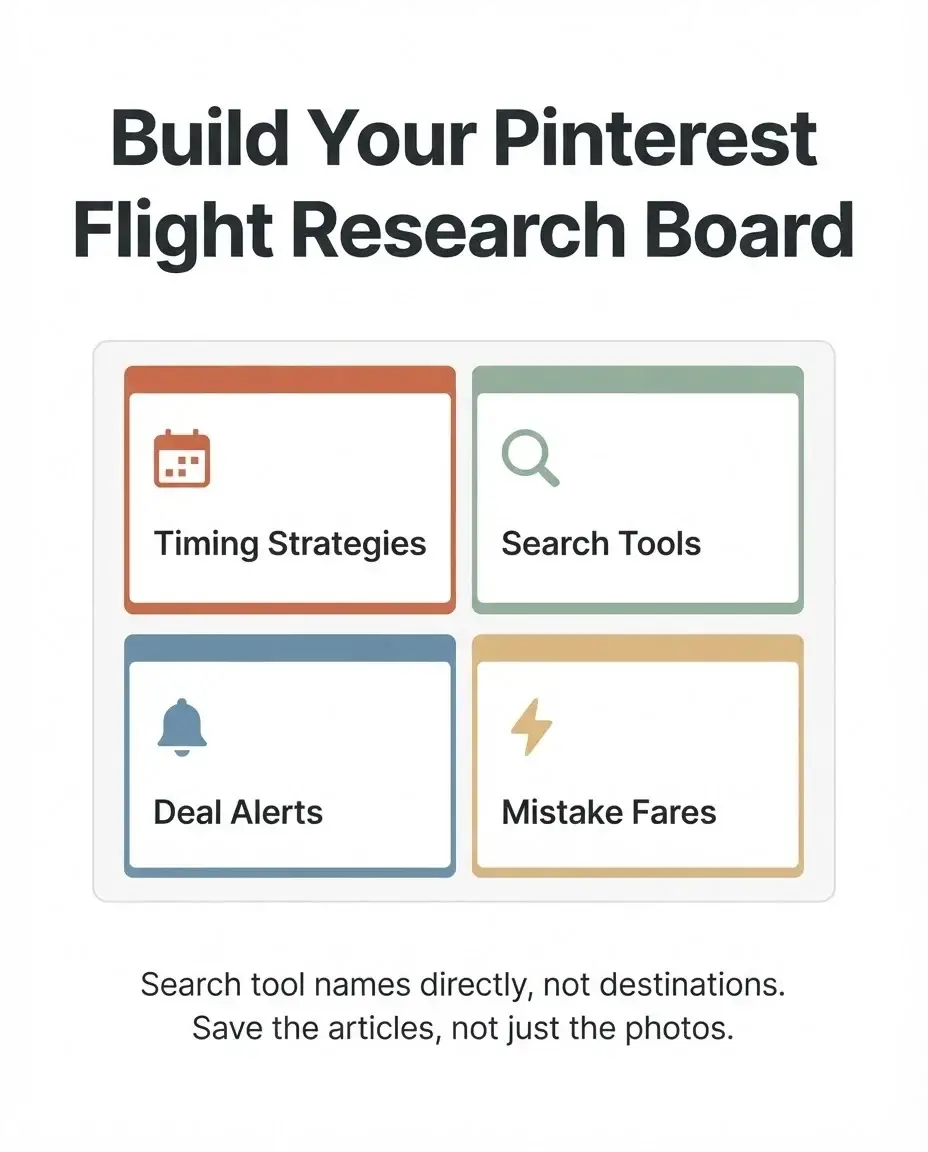
Here is how to use it with intention. Start by searching specific, tool-focused terms rather than dreamy destination terms. Try searches like: “Google Flights tutorial,” “flight price alert setup,” “how to find mistake fares,” “Skyscanner hacks,” or “Going.com review.” You will surface a completely different category of content than the typical travel aesthetic boards. Save the most useful articles to a private board you create specifically for this purpose. Call it something like “Flight Booking Research” and use Pinterest’s section feature to organize by category: Price Alert Tools, Timing Strategies, Flexible Search Tools, and Deal Alert Services. This turns your Pinterest account into a personal reference library rather than a mood board.
The real hack is treating Pinterest as a discovery engine that funnels you toward the actual tools and strategies covered below.
The Timing Truths That Save Real Money
Before you open any app or website, timing is the single most important variable in flight pricing. And most of the advice circulating online about timing is wrong or outdated.
Expedia’s 2025 Air Hacks Report, produced in partnership with the Airlines Reporting Corporation using billions of real booking data points, busted several myths that people have been pinning and re-pinning for years. The findings are worth reading in full if you want to go deep, and the Expedia 2025 Air Hacks report is publicly available with all the data laid out clearly. Here are the most important takeaways for the average traveler.
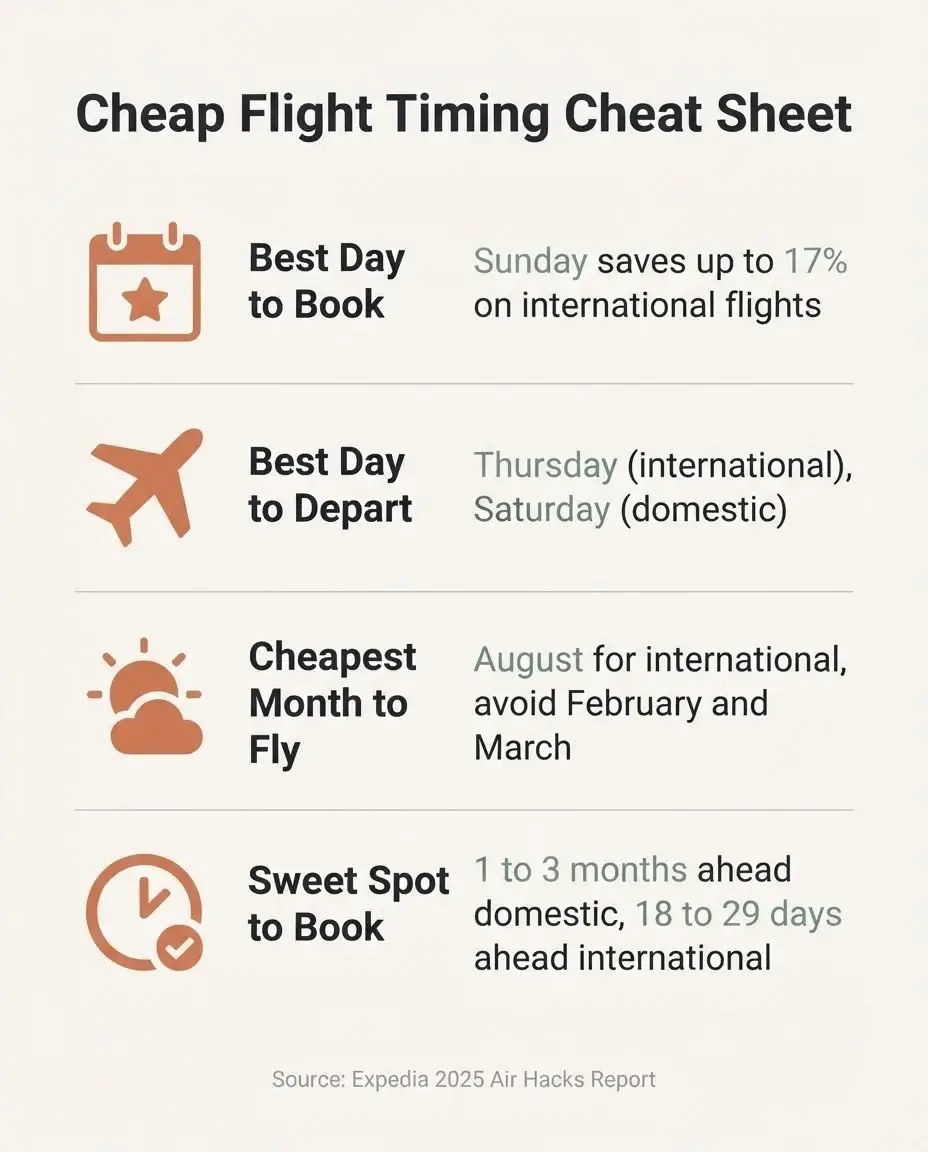
The best day to book is Sunday. For three years running, data shows Sunday is the cheapest booking day. Domestic travelers can save around 6% compared to booking on a Monday or Friday. International travelers can save up to 17%. That is not a small difference on an $800 ticket.
The cheapest day to depart internationally is Thursday. Flying out on a Thursday instead of a Sunday for international travel can save you around 15%. For domestic routes, Saturday departures tend to be the cheapest.
August is the cheapest month to fly internationally, not the most expensive. February and March are actually the priciest months for international flights. This surprised me the first time I read it, because August feels like peak season, but the data is consistent. Flying internationally in August vs. March can save up to 7%.
For domestic flights, book 1 to 3 months in advance to save up to 25% compared to last-minute booking. For international flights, the sweet spot is 18 to 29 days before departure, where you can save up to 17% compared to booking three months or more out. This is the one that shocks most people. The “book as early as possible” rule is not universal.
Write these down. Better yet, pin the Expedia report to your research board.
Google Flights: Your Free, No-Nonsense Starting Point
If you are only going to use one flight search tool, make it Google Flights. It is free, it is fast, and its two best features for budget travelers are almost embarrassingly underused.
The first is the Explore map. Go to google.com/travel/explore, type in your home airport, leave the destination blank, and watch a world map populate with prices. You can filter by travel dates, trip length, and budget. This is the tool to use when you have flexibility about where you go, or when you need a reality check on which destinations are actually affordable from your home city right now. For solo travelers especially, this is a revelation. When I was building a life around budget travel and working flexible jobs to fund my trips, the question I asked most often was not “how do I get to this one place cheaply?” but “where can I afford to go right now?” The Explore map answers that question in about thirty seconds.

The second is price tracking. Once you have a route in mind, you can turn on price tracking for that route and Google will email you when the fare changes significantly. You can track by specific dates or by “any dates” if your schedule is open, which will send you alerts whenever the route’s minimum price drops meaningfully. The step-by-step setup is explained on Google’s official support page for flight price tracking, and it takes about two minutes to configure. This is completely free and requires nothing more than a Google account.
The practical workflow: use the Explore map to identify your destination, then set a price alert for that route and wait. Do not book the moment you search. Let the alert do the work.
Skyscanner: The Tool for When You Are Flexible About Everything
Skyscanner’s Everywhere search feature is the version of the Explore map for people who want the simplest possible interface. You type in your departure city, type “Everywhere” as the destination, choose your dates or a rough month, and you get a ranked list of every destination in the world, sorted from cheapest to most expensive.
This is extraordinarily useful for solo travelers who have a week or two free and genuinely do not mind which country they end up in. The results show you the cheapest round-trip or one-way fares available from your airport across every destination Skyscanner tracks. You can filter by region, continent, or travel theme. If the cheapest option from New York in a given week is Reykjavik at $380 round-trip and you have never been to Iceland, that is your answer.
Skyscanner also has a Whole Month view that lets you see prices across an entire calendar month at once, so you can instantly identify the cheapest departure windows without manually checking every date. Combine this with what you now know about Thursday and Saturday departures being significantly cheaper, and you have a fast way to find the best possible combination of destination, date, and price.
Going.com: The Deal Alert Service Worth Knowing
Going.com, formerly known as Scott’s Cheap Flights, operates differently from Google Flights and Skyscanner. Instead of you searching for a route, Going searches for deals and pushes alerts to your inbox when fares drop far below their normal range. Their team of flight experts curates deals manually and only sends alerts when fares pass their internal “Bestie Test,” meaning the deal is genuinely exceptional, not just slightly lower than usual.
As Going.com explains on their how-it-works page, their free “Limited” tier sends a small selection of domestic economy deals. The Premium tier, which costs around $49 per year, unlocks all international deals, mistake fare alerts, and points-and-miles deals. Premium members reportedly save an average of $550 on each international flight. They do not sell you the ticket directly; they send you the deal with a direct link to book through the airline or an OTA. You buy your ticket at the discounted price, they take no commission.
For solo travelers who have flexibility about timing and can commit to a trip when a great deal lands in their inbox, Going is legitimately powerful. The key word is flexibility. This service rewards the kind of traveler who can see a $350 round-trip to Tokyo and say “yes, I am doing this in six weeks.”
Airfarewatchdog and Hopper: Two More Tools Worth Your Time
Airfarewatchdog works similarly to Going in that it monitors specific routes and airports for price drops, then alerts you. You can either enter a specific route to track or simply enter your home airport and receive alerts for deals departing from there, including flash sales that airlines push through quickly and quietly. This is particularly useful for travelers who have a home base and want passive monitoring of any opportunity that comes up.
Hopper takes a different angle. It uses historical pricing data and machine learning to predict whether a flight price will go up or down, then advises you to either book now or wait. You set a route you are watching, Hopper tracks the price continuously, and when it predicts the price is near its floor, it sends you a “book now” notification. When it thinks prices will drop further, it tells you to wait. It is not perfect, and no prediction tool ever is, but for travelers who have specific dates locked in and want a second opinion on whether to pull the trigger, it provides a useful reference point.
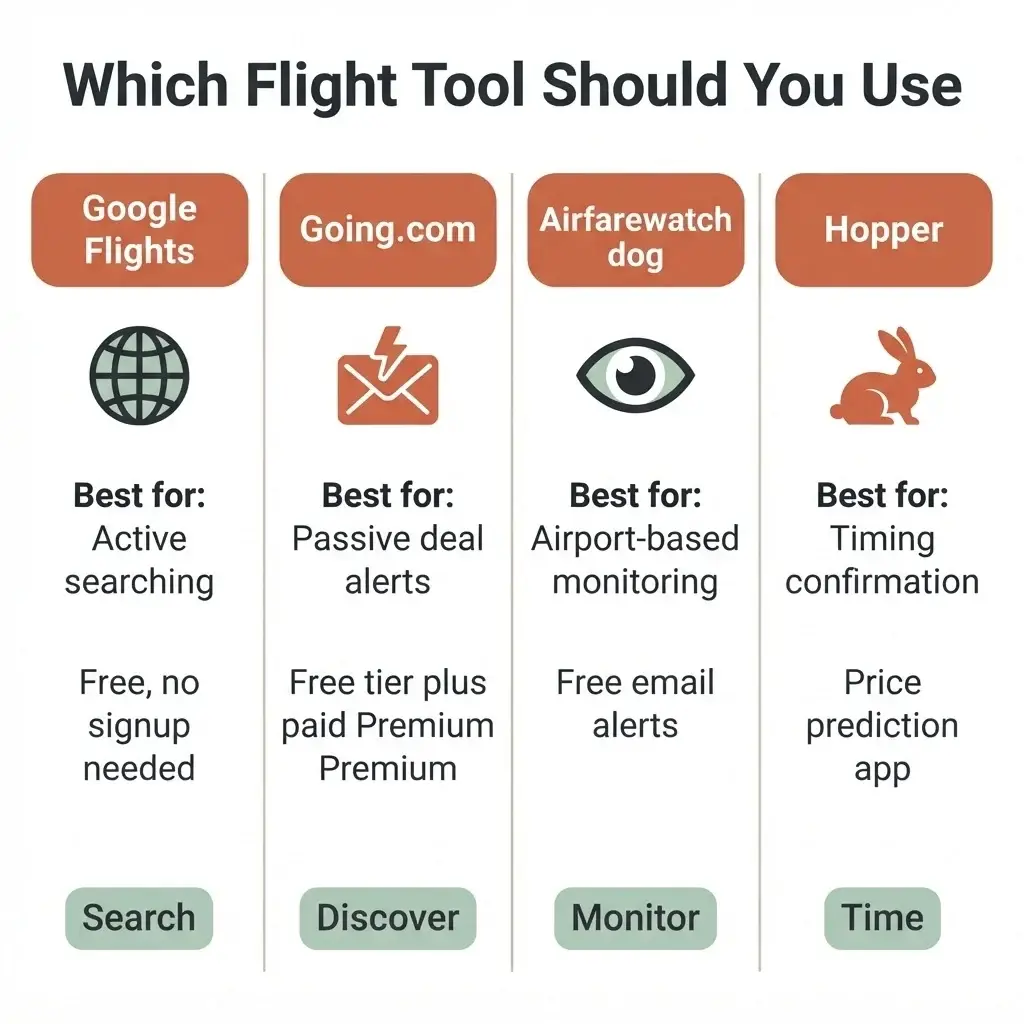
The smart approach is to use these tools in combination. Google Flights and Skyscanner for active searching. Going.com and Airfarewatchdog for passive deal discovery. Hopper for timing confirmation when you have already identified a route.
Mistake Fares: The Deals That Sound Too Good to Be True (But Sometimes Are True)
A mistake fare, also called an error fare, happens when an airline or booking system accidentally prices a flight far below its intended cost. A $2,000 round-trip to Tokyo suddenly appears at $180. A transatlantic business class ticket shows up at economy prices. These happen because of currency conversion errors, fat-finger data entry, or technical glitches in pricing systems.
The most reliable free source for tracking these is Secret Flying’s error fares page, which aggregates mistake fares as they appear in real time. Deals on the site have included things like round-trips from Western USA to East Asia for under $300. These fares disappear fast, often within hours, so the only way to catch them is to have a system: follow Secret Flying, subscribe to Going.com’s mistake fare alerts if you are on Premium, and act quickly when you see one that works for your schedule.
A few important notes from what experienced travelers consistently report: book directly with the airline when possible, as OTA bookings on mistake fares are more likely to be canceled. Hold off on buying non-refundable accommodation until the airline confirms the booking, which usually happens within 24 to 48 hours. Some airlines honor mistake fares; some cancel them and offer a refund. The risk is real, but the potential reward can be enormous.
The Incognito Mode Question (Let’s Be Honest About This)
If you have spent any time on Pinterest looking at cheap flight hacks, you have absolutely seen the tip: “always search in incognito mode so airlines don’t raise prices based on your search history.” It gets pinned and re-pinned constantly.
The reality is more nuanced. While dynamic pricing based on individual browsing cookies does happen to some extent, most airlines and search engines use broad demand and seat availability signals far more than individual cookie data to set prices. Using incognito mode is not a harm, and it does give you a cleaner search result without any personalization skewing your results. But it is not a guaranteed price-lowering trick. Think of it as basic search hygiene rather than a magic hack. Use it if you want to, just do not count on it as your primary strategy.
The strategies that actually move the needle are timing (Sunday booking, shoulder-season flying), flexible searching (Google Explore and Skyscanner Everywhere), and passive deal alerts (Going.com and Airfarewatchdog). Those are where your energy belongs.
Building Your Pinterest Research System (Putting It All Together)
Here is the full workflow, Pinterest-first, so it clicks as a real habit rather than a scattered checklist.
Start by creating a private Pinterest board called something like “Flight Booking Toolkit.” Add sections: Timing Strategies, Search Tools, Deal Alerts, and Mistake Fares. Then search Pinterest for each of the tool names covered in this article: Google Flights Explore, Skyscanner Everywhere, Going.com, Airfarewatchdog, Hopper, Secret Flying. Save the most useful, specific tutorial pins to each relevant section. You are building a reference board you can revisit every time you plan a trip.
When you are actively planning: open Google Flights Explore first to understand what is realistically affordable from your city. Cross-reference with Skyscanner Everywhere. Set price alerts on Google Flights for the routes you identify. Sign up for Going.com’s free tier at minimum. Follow Secret Flying for passive mistake fare monitoring.
When you are flexible and open: let Going.com and Airfarewatchdog bring deals to you instead of hunting. Check in once a week. When something lands in your inbox that excites you, verify the price, check your calendar, and if it works, book it.
The difference between travelers who consistently fly cheap and travelers who consistently overpay is rarely luck. It is mostly this: the second group waits until they want to take a trip and then searches. The first group runs a low-level background system year-round so they are ready when a good deal appears.
One Last Thing About Fear and First Steps
A lot of people save these flight-hacking pins on Pinterest and never act on them. The board fills up and the trip never happens. I know that feeling well, because I lived the opposite of it for a while. I was someone who read everything about travel and did very little of it until I decided the cost of staying was higher than the cost of going.
You do not need to master every tool on this list before your first cheap booking. Start with one: set up a Google Flights price alert for a route you have been curious about. Just one alert. That small action puts you in motion, and motion is where confidence builds. Every trip I have taken, from backpacking alone through Europe to teaching classes in Thailand to living with a family in Ghana, started with a single moment where I decided to stop waiting for conditions to be perfect and started working with what was in front of me.

The flight is out there. Now you know how to find it.